Author: admin

  • Miracase Upgraded Cup Phone Holder for Car: Features, Uses, and Compatibility Guide

    Miracase Upgraded Cup Phone Holder for Car: Features, Uses, and Compatibility Guide

    Introduction

    Smartphones have become useful companions during everyday driving. Drivers often rely on them for navigation, hands-free calls, traffic updates, and music playback. However, keeping a phone in a convenient position inside a vehicle can be challenging. A device placed on a passenger seat may slide around, while a phone resting in a center console can be difficult to see without looking away from the road.

    A dedicated car phone mount provides a more organized way to position a smartphone while driving. The right mounting arrangement depends on the vehicle’s interior, the driver’s preferred viewing position, and the size of the phone. Traditional mounts often attach to a windshield, dashboard, or air vent, but these locations are not equally convenient in every vehicle.

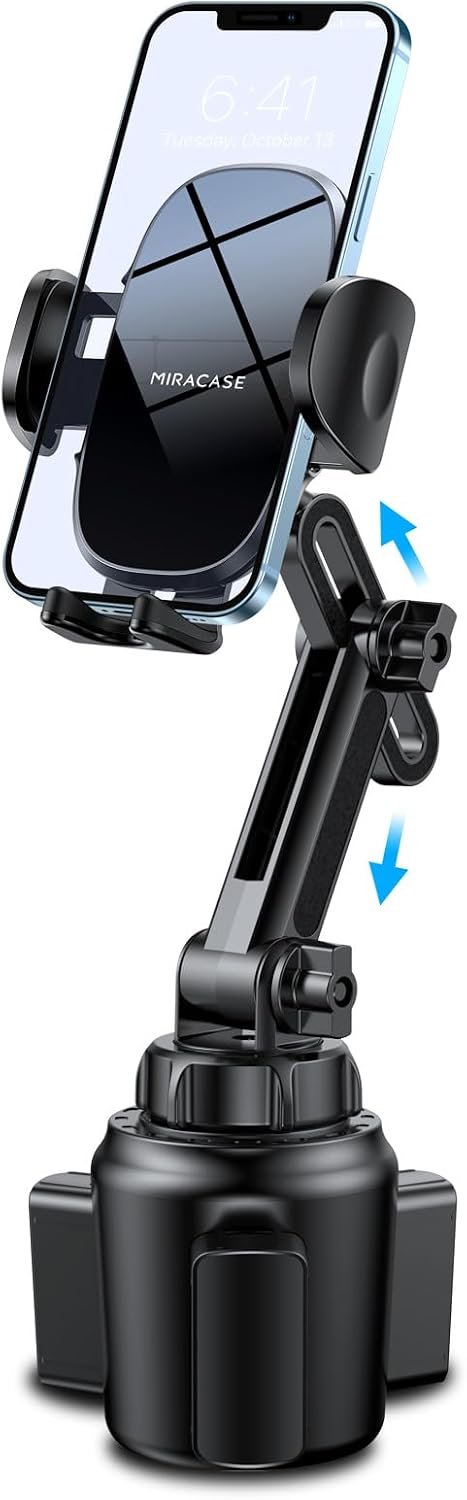
    The Miracase Upgraded Cup Phone Holder for Car takes a different approach. Designed to fit into a vehicle’s cup holder, this mount combines an adjustable base, a long neck, and a smartphone cradle. It is advertised as compatible with many smartphones measuring between 4.0 and 7.0 inches, including devices from Apple, Samsung, and Google. Actual compatibility depends on the phone’s dimensions, case, and the holder’s adjustment range.

    This type of mount may appeal to drivers who want to keep their windshield and dashboard clear or whose vehicles have conveniently positioned cup holders. At the same time, cup-holder placement introduces its own considerations, including access to the vehicle’s controls, the position of the gear selector, and the stability of the mount on uneven roads.

    Understanding how the Miracase cup phone holder works can help drivers determine whether this design suits their vehicle and daily routine. This guide explores its main features, practical applications, installation considerations, general alternatives, and important safety factors to consider before choosing a car phone mount.

    Key Features of the Miracase Cup Phone Holder

    1. Cup-Holder Mounting Design

    The defining feature of the Miracase mount is its cup-holder installation method. Instead of relying on adhesive, a suction cup, or an air-vent clip, the mount uses the vehicle’s cup-holder opening as its support point.

    This design can be useful in vehicles where the dashboard has a curved surface, the windshield is difficult to access, or the air vents are positioned inconveniently. It can also help drivers avoid attaching mounting hardware directly to interior trim.

    Cup holders vary considerably between vehicles. Some are relatively shallow, while others have a deeper opening or an adjustable insert. The fit of a cup-holder phone mount therefore depends on the shape and dimensions of the available space.

    Before installing the Miracase holder, users should check whether their vehicle has a suitable cup holder in a practical location. A holder positioned too far behind the driver, for example, may require unnecessary movement to see the screen. One located beside the gear selector could interfere with shifting or access to nearby controls.

    A secure installation should not require forcing the base into the cup holder. The mount should sit firmly while leaving the surrounding vehicle controls accessible.

    2. Adjustable Base

    The mounting base is intended to accommodate a vehicle’s cup-holder space. An adjustable base can help a mount fit different openings more effectively than a rigid design intended for one specific diameter.

    This matters because the dimensions of a cup holder can vary between cars, SUVs, pickup trucks, and other vehicles. Even two models from the same manufacturer may have different center-console layouts.

    The base should be adjusted according to the supplied instructions. Users should check that it is seated securely and does not rock excessively when the phone is positioned on the neck.

    Fit is particularly important when the vehicle travels over rough roads. A loose base may shift, causing the phone to move or the mount to become distracting.

    It is also worth checking whether the cup holder contains an insert that can be removed or adjusted. Any changes should follow the vehicle manufacturer’s guidance, especially if the cup holder is integrated with other console components.

    An adjustable base offers flexibility, but it does not guarantee compatibility with every vehicle. The actual dimensions and shape of the cup holder remain important.

    3. Long, Adjustable Neck

    The Miracase holder features a long neck designed to raise the phone above the cup-holder opening. This can help position the screen closer to a driver’s natural line of sight, depending on the layout of the vehicle.

    Without an extended neck, a phone mounted inside a cup holder might sit too low. A higher mounting position may improve visibility while leaving some space beneath the phone for other items or controls.

    The best height depends on the vehicle and the driver’s seating position. A phone positioned too low may encourage the driver to look down, while one positioned too high could obstruct the forward view.

    The neck’s adjustment range should also be considered in relation to the phone’s weight. A larger smartphone, especially one inside a heavy protective case, may place more leverage on an extended mount than a smaller device.

    After positioning the neck, users should confirm that the phone remains stable and that the mount does not obstruct the windshield, instrument cluster, or other important parts of the driver’s view.

    The purpose of the adjustable neck is to improve placement flexibility, not to guarantee that every vehicle will provide an ideal viewing position.

    4. Smartphone Cradle

    The phone cradle is designed to hold a compatible smartphone in place while the vehicle is moving. A dedicated cradle can help prevent the device from sliding around on a seat or center console.

    The product is advertised for smartphones in the 4.0-to-7.0-inch range. This measurement generally refers to the display’s diagonal size, but screen size alone does not determine whether a phone will fit securely.

    Two smartphones with similar display sizes may have different widths, thicknesses, camera arrangements, or case dimensions. A thick rugged case can also increase the overall size of a device.

    For this reason, users should confirm the cradle’s supported dimensions and check the current product information before choosing the mount.

    Once the phone is installed, the cradle should hold it securely without pressing unintended buttons or interfering with the screen. The camera and charging port should also remain accessible if those functions are needed while the vehicle is parked.

    A phone should never be placed in a way that prevents safe access to essential driving controls or distracts the driver.

    5. Compatibility With Common Smartphone Brands

    The Miracase cup phone holder is advertised as compatible with iPhone, Samsung, Google, and other smartphones that meet its stated size requirements.

    This broad compatibility can make a universal mount useful for households with several different devices. It may also be convenient for drivers who replace their phones periodically and prefer not to purchase a new mount every time they upgrade.

    However, brand names alone do not establish compatibility. A particular phone may be too wide, too thick, or otherwise unsuitable for the cradle, particularly when a protective case is installed.

    Users should check the phone’s dimensions rather than relying only on its model name or display size. If the product listing provides specific width limits, those measurements should take priority.

    It is also useful to distinguish between physical compatibility and electronic functionality. A standard phone cradle holds the device in place; it does not automatically provide wireless charging, power delivery, or integration with the vehicle’s infotainment system.

    Those functions depend on the phone, the vehicle, and any additional accessories being used.

    6. A Position That Does Not Depend on Dashboard Adhesion

    Some car phone mounts use adhesive pads or suction cups to attach to the dashboard or windshield. A cup-holder mount avoids those attachment methods by using an existing storage feature in the vehicle.

    This may appeal to drivers who prefer not to place adhesive materials on their dashboard or who have a surface that does not provide a suitable attachment point.

    The design can also reduce the need to remove and reapply a dashboard mount when moving between vehicles, provided the receiving vehicle has a compatible cup holder.

    There are trade-offs, however. A cup-holder mount occupies space that might otherwise hold a drink, and its position is limited by the location of the cup holder. In some vehicles, it may also be closer to the gear selector or other center-console controls.

    The mounting method is therefore best viewed as an alternative rather than a universally superior arrangement.

    7. A Dedicated Place for Navigation

    One practical reason to use a car phone holder is to keep navigation information visible without holding the device.

    When a phone is securely mounted, drivers can set up a route before departing and use compatible navigation applications to receive directions. A stable position may also make it easier to see upcoming turns or traffic information when the vehicle is stopped.

    Navigation should always be configured before driving whenever possible. Drivers should avoid typing destinations, searching through applications, or adjusting the mount while the vehicle is moving.

    Voice guidance can reduce the need to look at the screen. If the vehicle supports its own navigation system or smartphone integration, drivers should also consider whether those options provide a more suitable interface.

    The mount’s role is to position the phone. It does not independently provide navigation, cellular connectivity, or access to paid mapping features.

    How the Miracase Cup Phone Holder Can Be Used

    Everyday Navigation

    For regular commuting, a phone mount can provide a dedicated position for navigation applications. This may be useful when traveling through unfamiliar neighborhoods, following traffic updates, or locating an address.

    A cup-holder mount can work well when the center console places the phone within a comfortable viewing area. The adjustable neck may help raise the display above the console.

    Before leaving, the driver should choose a suitable mounting position, enter the destination, and confirm that spoken directions are working. The phone should remain secured throughout the journey.

    If the mount blocks a gear selector, emergency control, or important display, a different mounting location should be considered.

    Hands-Free Calls

    A mounted phone can make it easier to use compatible hands-free calling features. Depending on the smartphone and vehicle, calls may be handled through Bluetooth, the vehicle’s audio system, or an approved hands-free accessory.

    Keeping the phone mounted can prevent it from moving around the cabin, but it does not automatically make every call safe or legally permissible while driving.

    Drivers should follow local laws and minimize distractions. A hands-free conversation can still take attention away from the road, particularly in heavy traffic or complicated driving conditions.

    Setting up the connection before departure and avoiding manual interaction while moving are sensible precautions.

    Music and Audio Applications

    Many drivers use their smartphones for music, podcasts, audiobooks, and other audio content. A cup-holder phone mount can provide a convenient location for the screen when selecting content before a trip.

    If the vehicle supports Bluetooth or another compatible audio connection, the phone can often remain mounted while audio plays through the vehicle’s speakers.

    The mount itself does not improve sound quality or guarantee a wireless connection. Those features depend on the phone, the vehicle, and the audio equipment.

    For safety, playlists and destinations should be selected before driving. Drivers should avoid scrolling through libraries or changing settings while the vehicle is moving.

    Commuting Between Work and Home

    People who drive the same route regularly may appreciate having a consistent location for their phone. A fixed mounting arrangement can reduce the need to search for the device before starting the journey.

    The adjustable neck can also be repositioned when the driver’s seating position changes, although the mount should be adjusted only while the vehicle is safely parked.

    For vehicles shared by multiple drivers, the setup may need occasional adjustments to accommodate different seating positions or smartphone sizes.

    The cup holder should remain securely accessible when the mount is removed, particularly if other drivers use it for beverages.

    Long Road Trips

    During a longer journey, a phone mount may help keep navigation information accessible and prevent the device from moving around the center console.

    Travelers should plan the mounting position before departure, especially if they expect to use navigation for several hours.

    Heat is another consideration. A phone placed in direct sunlight may become hot, particularly when navigation, cellular data, and charging are used together. Drivers should avoid positioning the device where it receives unnecessary direct sunlight or blocks airflow needed by the vehicle.

    If the phone becomes excessively hot, users should follow the device manufacturer’s guidance and stop using or charging it until it returns to a suitable temperature.

    The mount does not replace the need for regular breaks, careful route planning, and attentive driving.

    Vehicles With Limited Dashboard Mounting Options

    Some dashboards have textured surfaces, unusual shapes, or limited flat areas. Others may contain screens, air vents, or controls that make a traditional mount inconvenient.

    A cup-holder mount offers another option when a suitable holder is available. Because it does not depend on a flat dashboard surface, it may be useful in vehicles where adhesive or suction-based mounts are difficult to position.

    The center console should still be evaluated carefully. A cup holder near a gear selector, parking brake, or frequently used control may not be appropriate.

    Drivers should prioritize an unobstructed view of the road and convenient access to vehicle controls over any particular mounting method.

    Shared Vehicles and Multiple Smartphones

    A universal-style cradle may be useful in households where different drivers use different smartphones.

    For example, one person may use an iPhone while another uses a Samsung or Google phone. If both devices fall within the holder’s supported dimensions, the same mount may accommodate them without requiring a separate mounting system.

    Users should check the fit whenever the phone changes, particularly when moving from a lightweight device to a larger model or adding a thicker case.

    The phone should be removed and reinstalled only when the vehicle is safely parked. A secure fit should be confirmed before beginning the next journey.

    Who May Find This Mount Suitable?

    Drivers Who Prefer Cup-Holder Mounts

    People who want to keep their windshield and dashboard clear may appreciate a mount that uses an existing cup-holder opening.

    This approach may be particularly convenient when the center console is positioned near the driver’s normal viewing area.

    The main requirement is having a cup holder in a practical location that does not interfere with controls or other necessary functions.

    Drivers With Incompatible Dashboard Surfaces

    Some vehicles have dashboard materials that do not work well with certain adhesive pads or suction cups. A cup-holder mount can offer an alternative that does not rely on those surfaces.

    It is still important to check the dimensions of the cup holder and the position of the phone once installed.

    People Who Use Navigation Frequently

    Commuters, delivery drivers, and travelers who regularly use smartphone navigation may benefit from having a consistent phone location.

    The holder can keep the device in place, while the adjustable neck may help bring the screen into a more suitable position.

    Anyone driving professionally should also check applicable rules governing phone use and mounting equipment.

    Households With Different Smartphones

    A mount advertised for a range of smartphone sizes may be practical for households that share vehicles.

    However, users should verify the dimensions of every phone that will be used. A cradle that fits one phone securely may not necessarily fit another device with a different case or body shape.

    Drivers Who Want a Simple Mounting Arrangement

    A cup-holder mount may suit someone who wants to position a phone without attaching hardware to the windshield or dashboard.

    It is primarily a mounting accessory, so users who need wireless charging, integrated power, or specialized vehicle connectivity may need additional equipment.

    Important Things to Consider Before Choosing the Miracase Holder

    Measure the Vehicle’s Cup Holder

    The first step is checking whether the cup holder can accommodate the mounting base.

    Cup holders differ in diameter, depth, shape, and surrounding trim. Some include removable inserts, while others are built into a center console that contains additional components.

    Check the manufacturer’s stated fit requirements and compare them with the vehicle’s available space. Avoid forcing the base into an opening that is too small or modifying vehicle components without appropriate guidance.

    Check the Position Relative to Driving Controls

    A phone holder should not block the gear selector, parking brake, climate controls, emergency switches, or other important controls.

    The phone should also remain outside the driver’s critical forward field of view. Even if a mount physically fits, its location may make it unsuitable for safe use.

    Check the intended position while seated in the normal driving position, but make all adjustments with the vehicle parked.

    Verify Smartphone Dimensions

    The advertised 4.0-to-7.0-inch compatibility range provides a general indication of the devices the holder is intended to accommodate. It should not be treated as a guarantee that every phone within that display-size range will fit.

    Phone width, thickness, case dimensions, and cradle adjustment limits all matter.

    If the phone is close to the stated size limits, compare its measurements with the specifications in the current product listing before making a decision.

    Consider the Weight of the Phone

    A large smartphone inside a rugged case can place more weight on the mount than a smaller device.

    The long neck also creates leverage, which may increase movement if the base is loose or the road is uneven.

    Users should follow the manufacturer’s guidance concerning supported devices and check that the mount remains stable during normal vehicle movement.

    If the phone wobbles excessively, the base shifts, or the setup becomes distracting, it should be repositioned or replaced with a more suitable mounting arrangement.

    Think About Cup-Holder Availability

    Cup-holder mounts use space that might otherwise be needed for a beverage. This may be inconvenient for drivers who rely on every available cup holder, particularly when carrying passengers.

    Consider whether another cup holder is available and whether the mount’s position allows passengers to access drinks comfortably.

    If the vehicle has only one conveniently located cup holder, a dashboard, vent, or windshield mount may be more practical.

    Check Access to Charging Ports

    Some drivers prefer to charge their phones during navigation or long trips. Before selecting a mount, consider where the phone’s charging port will be positioned and whether a cable can reach it without creating a hazard.

    The Miracase holder should not be assumed to provide built-in charging unless the current product listing explicitly states otherwise.

    Any charging cable should be routed away from pedals, the gear selector, and other moving or frequently used controls.

    Account for Road Conditions

    A mount that feels stable while parked may move more noticeably on rough roads, over speed bumps, or during sudden braking.

    A securely fitted base and properly adjusted neck can help reduce unwanted movement, but performance depends on the vehicle, phone, installation, and road conditions.

    Check the mount before each trip, especially after removing or reinstalling it.

    Consider Heat and Sunlight

    Smartphones can become warm when running navigation applications, using cellular data, or charging. Direct sunlight can add to that heat.

    A cup-holder mount may position the phone away from the windshield in some vehicles, but the result depends on the console layout and sunlight entering the cabin.

    Follow the phone manufacturer’s temperature guidance and avoid covering ventilation openings or placing the device where it receives unnecessary heat.

    Review Installation and Maintenance Instructions

    The correct installation procedure depends on the holder’s specific design. Users should follow the supplied instructions for adjusting the base, attaching the cradle, and positioning the neck.

    Periodically check the mounting connections for looseness or wear. If any component becomes damaged, stop using the mount until it has been inspected or replaced.

    A simple inspection before driving can help identify problems before they become a distraction.

    Comparing General Categories of Car Phone Mounts

    Different mounting styles solve similar problems in different ways. The most suitable choice depends on the vehicle’s layout, the driver’s preferences, and the phone’s dimensions.

    Cup-Holder Mounts

    Cup-holder mounts use the center console as their support point. They may suit vehicles with conveniently positioned cup holders and drivers who prefer not to attach hardware to the dashboard or windshield.

    Their main limitations are the space they occupy and the fact that their location is determined by the cup holder.

    The Miracase design belongs to this category, combining a cup-holder base with an adjustable neck and smartphone cradle.

    Dashboard Mounts

    Dashboard mounts position the phone on the dashboard using an attachment system designed for the relevant surface.

    Depending on the design, they can place the phone closer to the driver’s natural viewing area. However, compatibility may depend on the dashboard’s texture, curvature, and available flat space.

    Users should also consider whether the mount or phone could interfere with airbags or obstruct the forward view.

    Windshield Mounts

    Windshield mounts typically use suction-based attachment to position a phone on the glass.

    They may offer a flexible viewing position in some vehicles, but local laws and regulations can restrict where devices may be mounted on a windshield. Visibility and airbag considerations should always take priority.

    Drivers should confirm the relevant requirements before choosing this type of mount.

    Air-Vent Mounts

    Air-vent mounts attach to a vehicle’s ventilation grille. They can be compact and easy to access, but compatibility depends on the vent’s design and strength.

    Some vehicles have vents that are poorly suited to mounting accessories. The phone may also be exposed to hot or cold airflow, depending on the climate-control settings.

    A vent mount can be useful where a compatible grille is conveniently positioned, but it is not appropriate for every interior.

    Magnetic Mounts

    Magnetic mounts use magnetic attachment to hold a compatible phone or a plate attached to it.

    They can make attaching and removing a phone convenient, although the phone’s case, magnetic compatibility, and the mount’s rated support all need consideration.

    Magnetic mounting does not automatically provide wireless charging. Charging capability depends on the specific accessory and device configuration.

    Choosing Between the Categories

    A cup-holder mount may be the right fit for someone who has a suitable center console and wants to avoid attaching hardware elsewhere. A dashboard, vent, windshield, or magnetic mount may be more convenient in a vehicle where cup-holder placement is awkward.

    The best approach is to assess the vehicle first rather than selecting a mount based only on its advertised features. Safe visibility, a secure fit, and unobstructed access to driving controls are more important than any particular mounting style.

    Frequently Asked Questions

    1. What is the Miracase Upgraded Cup Phone Holder?

    It is a car phone mount designed to sit in a vehicle’s cup holder. The product combines an adjustable base, a long neck, and a smartphone cradle to position a compatible phone within reach and view.

    2. Which smartphones are compatible?

    The product is advertised for iPhone, Samsung, Google, and other smartphones measuring between 4.0 and 7.0 inches. Actual fit depends on the phone’s physical dimensions, case, and the cradle’s supported range.

    Check the current product listing for exact compatibility details.

    3. Does the mount fit every car?

    No universal fit should be assumed. Cup holders vary in size, depth, shape, and location.

    Before choosing the mount, check the vehicle’s cup-holder dimensions and confirm that the installed phone will not obstruct controls or the driver’s view.

    4. Can the neck be adjusted?

    The product is described as having a long, adjustable neck. Its purpose is to provide flexibility in positioning the smartphone above the cup-holder opening.

    Follow the manufacturer’s instructions when changing the position, and make adjustments only when the vehicle is parked.

    5. Can the mount be used for GPS navigation?

    Yes, a compatible smartphone can be held in the mount while a navigation application is running.

    The driver should set the destination before departure, use spoken directions where practical, and avoid manually interacting with the phone while driving.

    6. Does it support wireless charging?

    The product title identifies a phone holder and mounting cradle, not a wireless charger. Do not assume that it provides charging functionality unless the current listing explicitly confirms it.

    A compatible charging cable or separate accessory may be required if charging is needed.

    7. Will it hold a phone with a protective case?

    That depends on the phone’s overall dimensions and the cradle’s supported range. A thick or rugged case can make a device larger than its advertised bare dimensions.

    Check the phone’s width and thickness with the case installed before relying on compatibility.

    8. Can the mount be used in an SUV or pickup truck?

    It may be suitable if the vehicle has a compatible cup holder in a practical location. The console layout, holder dimensions, and phone position should be checked before installation.

    The product should not be assumed to fit every SUV, pickup, or passenger vehicle.

    9. Will it interfere with the gear selector?

    That depends on where the cup holder is located and how the neck is positioned. Some center consoles have cup holders very close to the gear selector or other controls.

    Confirm that the mount leaves all controls fully accessible before driving.

    10. Is a cup-holder mount better than a windshield mount?

    Neither style is ideal for every vehicle. Cup-holder mounts avoid attaching hardware to the windshield but occupy a cup holder and are limited by the console layout.

    Windshield mounts provide a different range of positions, but visibility, local mounting rules, and safe placement must be considered.

    11. Is the holder suitable for long road trips?

    It may be useful for keeping a compatible phone positioned for navigation during longer journeys. However, stability, heat, charging arrangements, and access to controls should be evaluated before use.

    Drivers should take appropriate breaks and remain attentive to the road.

    12. How can users keep the mount stable?

    Install the base according to the supplied instructions, confirm that the phone is secured in the cradle, and avoid extending or positioning the neck in a way that makes the assembly unstable.

    Inspect the mount periodically, especially after removing or reinstalling it. Do not use it if any part is damaged or loose.

    Conclusion

    The Miracase Upgraded Cup Phone Holder offers an alternative to dashboard, windshield, and air-vent mounts by using a vehicle’s cup holder as its mounting point. Its adjustable base, long neck, and smartphone cradle are intended to provide a practical way to position compatible phones for navigation and other in-car functions.

    The design may be useful for drivers who prefer to keep their windshield and dashboard clear, provided their vehicle has a conveniently positioned cup holder. Its advertised compatibility with smartphones measuring between 4.0 and 7.0 inches also makes it worth considering for users with different devices, although physical dimensions and protective cases must be checked.

    Before choosing the holder, evaluate the cup-holder fit, phone dimensions, stability, and the position of nearby controls. The phone should remain securely mounted without obstructing the driver’s view or interfering with safe vehicle operation.

    A suitable car phone mount should make the driving environment more organized rather than introduce another distraction. Taking time to confirm compatibility and positioning can help determine whether this cup-holder design fits the vehicle and the driver’s everyday needs.
    You can check more details on Amazon here:

  • UBeesize 12-Inch LED Ring Light With 62-Inch Tripod: Features, Uses, and Setup Guide

    UBeesize 12-Inch LED Ring Light With 62-Inch Tripod: Features, Uses, and Setup Guide

    Introduction

    Good lighting can make a noticeable difference in photographs, videos, online meetings, and other forms of digital communication. Even a relatively simple recording setup can produce more consistent results when the subject is clearly illuminated. However, achieving suitable lighting at home is not always straightforward. Ceiling lights may create shadows, windows can produce uneven brightness, and ordinary desk lamps may be difficult to position correctly.

    A ring light is one option for addressing these challenges. It provides a circular light source that can be positioned around or near a smartphone camera, helping illuminate the subject from the front. Ring lights are commonly used for video calls, social media content, makeup tutorials, product demonstrations, and casual photography.

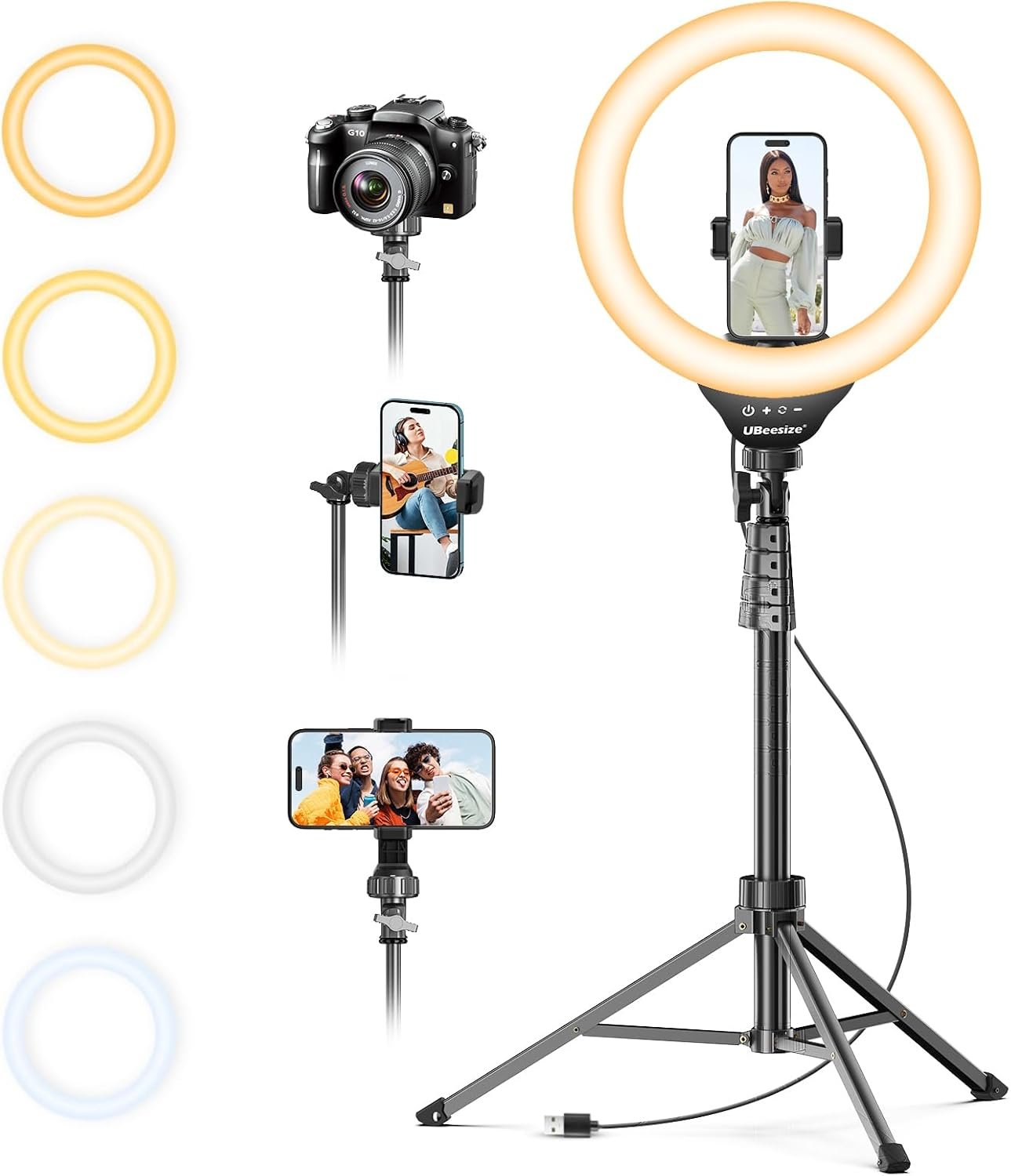
    The UBeesize 12-inch LED Ring Light with a 62-inch tripod stand, phone holder, and remote is designed around this type of setup. Its combination of a ring-shaped LED light, adjustable support, smartphone mounting hardware, and remote control brings several basic recording accessories together in one package. Rather than requiring users to assemble a lighting arrangement from separate components, this type of kit provides a starting point for creating a dedicated space for filming or taking pictures.

    Understanding the equipment’s features is important before deciding whether it fits a particular workspace or recording routine. The size of the light, the height of the stand, the position of the phone, and the way brightness is adjusted can all influence how comfortably the setup works in everyday situations.

    This guide explains the general functions of the UBeesize 12-inch ring light kit, how it can be incorporated into different activities, who may find this type of equipment useful, and which practical considerations deserve attention before choosing it.

    Key Features of the UBeesize 12-Inch LED Ring Light

    1. A 12-Inch Circular Light Source

    The central component is a 12-inch LED ring light. Its circular shape allows the light to surround the area where a compatible phone camera can be positioned, creating a forward-facing lighting arrangement.

    The size of a light source influences how it illuminates a subject. Compared with a small point light, a larger source positioned relatively close to a person can produce softer-looking shadows. The result depends on the distance between the light and the subject, the surrounding environment, and the camera’s exposure settings.

    For example, someone recording a talking-head video at a desk may position the ring light just behind or around the smartphone. This arrangement can illuminate the face more evenly than relying entirely on a ceiling fixture positioned overhead.

    A 12-inch light is also a practical middle ground for many personal recording spaces. It is larger than a compact clip-on light but generally less cumbersome than a large studio softbox. Nevertheless, its illumination area remains limited compared with professional lighting equipment intended for larger rooms or group recordings.

    The light is only one part of the setup. Its placement and distance from the subject can have as much influence on the final appearance as the size of the ring itself.

    2. LED Lighting for Everyday Recording

    LED lighting is widely used in compact recording accessories because it can provide illumination without requiring the type of bulky equipment associated with traditional studio lamps.

    For everyday content creation, an LED ring light can help reduce dependence on changing natural light. Someone who records short videos in the evening, for example, may prefer having a dedicated light source rather than relying on daylight that is no longer available.

    The actual lighting result depends on several factors, including the light’s output, its selected brightness level, the distance to the subject, and the ambient light already present in the room.

    It is also worth remembering that brighter lighting is not automatically better. Excessive illumination can wash out skin tones, create unwanted reflections on glasses, or make reflective products appear overly bright. Adjusting the light’s position and output can help maintain a more balanced image.

    Users should consult the product’s current specifications and included instructions for details about its lighting modes, power requirements, and adjustment controls.

    3. A Tripod Stand Extending to 62 Inches

    The kit includes a tripod stand advertised as extending to 62 inches. An adjustable stand allows the light and phone holder to be positioned at different heights, making it easier to adapt the arrangement to different recording activities.

    A lower position may work well for seated video calls or desk-based demonstrations. A taller position can be more convenient for standing presentations, full-body framing, or recordings in which the camera needs to sit above a table.

    The ability to change height also helps users experiment with camera angles. Positioning the phone near eye level is often a useful starting point for conversational videos because it produces a more natural perspective than placing the camera far below the subject’s face.

    However, the advertised maximum height does not mean every recording should use the tallest setting. A fully extended tripod can be more sensitive to bumps, uneven floors, and accidental contact. Its stability also depends on how the legs are spread, the weight distribution, and the surface underneath it.

    Before recording, users should ensure the tripod is standing securely and that the light and phone are properly attached. Keeping cables away from walking paths can further reduce the chance of pulling the setup over.

    4. A Smartphone Holder

    The included phone holder is intended to support a compatible smartphone while it is being used with the ring light. This combination allows users to keep the camera and light in approximately the same recording area.

    A dedicated holder can be useful when filming without another person to operate the camera. Once the phone is positioned and the recording settings have been selected, the user can speak, demonstrate a product, or perform another activity while the smartphone remains in place.

    Phone compatibility is an important consideration. Smartphone dimensions, case thickness, and the holder’s mounting design can affect whether a particular device fits securely. Users should check the supported phone dimensions and the instructions supplied with the kit rather than assuming every phone will fit.

    It is also useful to confirm that the holder allows the camera to remain unobstructed. Some recording activities work better with the phone in portrait orientation, while others benefit from landscape framing. The holder’s adjustment range determines how conveniently these positions can be achieved.

    A secure mount is particularly important when the tripod is extended or the phone is relatively heavy. Users should verify that the phone is firmly held before moving away from the setup.

    5. Remote Control for Convenient Operation

    The product listing identifies a remote as part of the kit. Remote controls can make a smartphone recording arrangement more convenient by reducing the need to touch the phone during certain operations.

    For instance, someone filming a short presentation may position the phone on the tripod, move into the recording area, and use a compatible remote function to start capturing content. This can be helpful when recording alone or when the phone is positioned slightly beyond comfortable reach.

    The precise functions depend on the supplied remote and the phone being used. Some remotes operate a compatible camera shutter, while other controls may support additional functions. Users should check the manufacturer’s instructions to determine what the included remote can do with their particular smartphone and camera application.

    Compatibility should not be assumed across every device or application. Bluetooth pairing, operating-system behavior, and camera software can affect remote operation.

    A remote is a convenience rather than a substitute for checking the recording itself. Before an important session, users should confirm that the camera is capturing video or photos correctly, the framing is appropriate, and the audio is working as expected.

    6. A Combined Lighting and Recording Arrangement

    One practical advantage of a kit containing a light, tripod, phone holder, and remote is that these components can be organized around a single purpose.

    A beginner setting up a small filming area may otherwise need to identify a compatible phone mount, a suitable stand, and a separate lighting accessory. A bundled arrangement can simplify that initial process, provided the included components meet the user’s requirements.

    This does not eliminate every setup decision. Users still need to consider the location of power outlets, the recording space, phone compatibility, and whether the equipment can be stored comfortably when it is not in use.

    The kit is best understood as a foundation for a basic smartphone recording setup rather than a complete professional studio. Audio recording, background control, editing, and room acoustics may require separate attention depending on the intended project.

    How the UBeesize Ring Light Can Be Used

    Creating Social Media Videos

    Short-form video has become a common format for sharing tutorials, demonstrations, personal updates, and educational material. A ring light and smartphone tripod can help creators maintain a consistent camera position while recording these clips.

    For example, a creator making a series of short educational videos can mark a regular tripod position on the floor or desk, place the phone at a consistent height, and keep the light at a similar distance between sessions.

    This repeatable arrangement can reduce the amount of time spent preparing each recording. It also makes it easier to compare footage from different days and maintain a recognizable visual style.

    Lighting should complement the subject rather than dominate the scene. A creator can begin with a moderate light setting, review the phone’s preview, and adjust the angle or brightness as needed.

    Background clutter, camera placement, and audio quality remain important. A ring light may improve visibility, but it cannot independently correct a noisy room, distracting background, or poorly framed shot.

    Recording Makeup and Skincare Tutorials

    Makeup demonstrations often benefit from lighting that makes facial details visible. A ring light can illuminate the face from a forward-facing position, helping viewers see how a product is applied and how different shades appear under the recording conditions.

    The setup may also be useful for skincare routines, hair styling, and other personal-care demonstrations.

    However, artificial lighting can change the apparent color of makeup and skincare products. A shade that appears accurate under one light source may look different in natural daylight or another room. For demonstrations involving color matching, it is helpful to compare the camera preview with the product under more than one lighting condition.

    Reflections also deserve attention. Glasses, shiny packaging, and glossy cosmetic products can reflect the circular light source. Slightly changing the light’s height or angle may reduce unwanted glare.

    The most useful arrangement is one that provides adequate visibility without making the subject look unnaturally bright.

    Supporting Video Calls and Online Meetings

    A dedicated ring light can be useful for people who regularly attend remote meetings, online classes, consultations, or virtual interviews.

    A room’s normal lighting may be uneven, especially when a window is behind the person on camera. In that situation, the face can appear darker because the camera is exposed for the brighter background.

    A forward-facing light can help balance the scene by illuminating the person from the front. Positioning the camera near eye level can also create a more comfortable viewing angle for colleagues or classmates.

    The 62-inch stand offers flexibility for users who want the phone positioned above a desk or at a standing presentation height. Whether the maximum height is appropriate depends on the furniture arrangement and the individual’s camera framing requirements.

    For computer-based meetings, a smartphone ring light may not be the most convenient option if the user relies on a webcam. It may still provide useful illumination, but the phone holder is primarily relevant when a smartphone is serving as the camera.

    Photographing Small Products

    Small-business owners, online sellers, and hobbyists often need clear photographs of products for catalogs, listings, or social media posts.

    A ring light can provide frontal illumination for objects such as accessories, stationery, craft items, and small household products. A tripod helps maintain a consistent camera position, which is useful when photographing multiple items in the same session.

    For product photography, the relationship between the light and the object matters. Shiny surfaces may reflect the ring’s circular shape, while transparent items can require more careful positioning. Moving the light slightly to one side or introducing a suitable diffuser, when appropriate, may improve the appearance of the image.

    A ring light is not a replacement for every type of product lighting. Larger products may require a broader light source, and products with intricate textures may benefit from lighting from the side to reveal their shape.

    For small objects, users should also check the minimum focusing distance of their smartphone camera. Moving the phone too close can result in soft focus, regardless of how well the scene is illuminated.

    Recording Educational Content

    Teachers, tutors, coaches, and independent educators can use a smartphone tripod and light to create lessons, demonstrations, and instructional videos.

    A fixed camera position is particularly useful for content that includes spoken explanations or demonstrations performed at a desk. The creator can prepare the equipment once and then focus on explaining the subject.

    For a lesson involving books, tools, or handwritten notes, the phone may need to be angled toward the work surface. The included holder’s adjustment capabilities determine how easily that position can be achieved.

    A ring light can illuminate the workspace, although overhead or side lighting may be more appropriate when the subject is a flat page. The best arrangement depends on whether the video focuses primarily on the instructor, the demonstration, or both.

    Creators should conduct a short test recording before preparing a complete lesson. This helps reveal shadows, focus problems, reflections, and framing issues while there is still time to adjust the setup.

    Producing Livestreams

    Livestreaming requires a recording arrangement that remains functional for the duration of a broadcast. A tripod can keep the smartphone in place while the light helps maintain more consistent illumination.

    Possible uses include live discussions, informal demonstrations, product presentations, and interactive educational sessions.

    Before beginning a stream, users should confirm that the phone has sufficient battery power, the internet connection is reliable, and the chosen application supports the intended orientation and camera settings.

    Long sessions can introduce practical challenges. The phone may heat up, the lighting may require continuous power, and the equipment may occupy more space than expected. Cable management and ventilation should therefore be considered when planning a permanent streaming corner.

    The ring light and stand support the physical recording arrangement, but they do not guarantee stream quality. Audio clarity, connection stability, presentation structure, and audience interaction remain separate considerations.

    Improving a Home Recording Space

    A dedicated recording corner can make content creation more organized. The ring light and tripod can be placed near a desk, against a plain background, or in another location where the phone has a clear view of the subject.

    Some users may leave the equipment assembled between sessions. Others may prefer to fold or disassemble the stand and store it away to keep the room uncluttered.

    Before choosing a permanent location, consider the stand’s footprint, the route of any power cable, the availability of a suitable background, and the amount of room needed to move around comfortably.

    The light does not have to be positioned directly in front of the subject in every situation. Small changes in distance and angle can help control reflections and create a more natural appearance.

    A consistent setup is often more useful than an elaborate one. Even a modest recording space can work well when the lighting, camera position, background, and sound are considered together.

    Who May Find This Type of Ring Light Suitable?

    Beginner Content Creators

    People starting to make videos with a smartphone may appreciate having a light and stand available in one kit. It provides a straightforward way to experiment with camera angles and basic lighting without immediately investing in a complex studio arrangement.

    Beginners can start with simple talking-head videos, then adjust the setup as they learn more about framing, exposure, and sound.

    Social Media Creators

    Creators who regularly publish short videos, tutorials, or personal updates may find the combination useful for maintaining a repeatable filming position.

    The setup can be especially practical for individuals who record alone and need a stable place to mount their phone.

    Remote Workers and Online Educators

    People who frequently appear on video calls may benefit from having a dedicated source of front-facing illumination. Teachers and tutors may also appreciate the flexibility to adjust the stand for different demonstrations.

    Users should still consider whether a smartphone-based setup matches the camera equipment they already use.

    Makeup Enthusiasts and Personal-Care Creators

    The circular light arrangement may help illuminate the face during makeup application or beauty-related recordings. It can also serve as a lighting source for informal photographs.

    People who need precise color reproduction should test the light carefully, because artificial illumination and smartphone processing can affect how colors appear.

    Small Businesses and Hobbyists

    Individuals who photograph small items for online listings, craft projects, or social media may find a tripod and ring light useful for creating more consistent images.

    Those who photograph large products, highly reflective objects, or professional commercial work may need additional lighting equipment and a more specialized setup.

    Important Things to Consider Before Choosing a Ring Light Kit

    Confirm the Included Accessories

    Product bundles can change over time, and accessories may vary between listings or versions. Before making a decision, check the current product page to confirm that the 12-inch ring light, 62-inch tripod, phone holder, and remote are included in the configuration being considered.

    Reviewing the listing’s specifications and photographs can help clarify what is supplied and whether additional accessories are needed.

    Check Phone Compatibility

    Not every smartphone fits every holder. Consider the phone’s dimensions, weight, case thickness, and the holder’s stated compatibility range.

    Also check whether the phone can be positioned vertically and horizontally if both orientations are important to your work.

    A secure fit is essential. The phone should remain stable when the holder is adjusted, and the camera lens should remain unobstructed.

    Understand Lighting Limitations

    A 12-inch ring light can be useful for a person sitting or standing relatively close to the camera. It is not necessarily suitable for illuminating an entire room or a large group.

    The result also depends on ambient lighting. Strong sunlight, overhead fixtures, and light-colored walls can affect how the scene appears.

    A ring light may help reduce some shadows, but it does not eliminate every shadow or guarantee professional-looking footage. Experimenting with the position, distance, and brightness is part of using any lighting accessory effectively.

    Consider Tripod Stability

    The maximum advertised height is only one part of tripod performance. The spread of the legs, the floor surface, the weight of the phone, and the position of the light all influence stability.

    A stand placed on an uneven surface may wobble. An extended stand can also be easier to knock over accidentally.

    Keep the tripod away from doorways and high-traffic areas, and avoid placing it where pets or children may pull on it. Check the mounting connections before every session.

    Review the Power Requirements

    LED lights require a suitable power source. Check the current listing and included documentation for the kit’s power connection, cable arrangement, and any requirements for a compatible USB power adapter.

    Do not assume that every accessory in a bundle is powered in the same way. The light and remote may have different power requirements.

    If the equipment will be used for extended livestreams, consider how the light will remain powered and how the phone will be charged without creating a cable hazard.

    Consider Space and Storage

    Although a ring light kit is more compact than many studio arrangements, the tripod still needs room for its legs and enough clearance to position the phone correctly.

    Measure the available space if the equipment will be used in a small bedroom, shared workspace, or compact home office.

    If the stand will be stored after each session, check the folded dimensions and the manufacturer’s guidance for adjusting or disassembling it.

    Do Not Overlook Audio Quality

    Lighting improves visibility, but viewers also need to hear the content clearly. A ring light kit does not necessarily include a dedicated microphone.

    For spoken videos, consider room echo, background noise, microphone distance, and whether the smartphone’s built-in microphone is adequate for the intended recording.

    A quiet room and careful microphone placement can improve the listening experience without requiring a complicated audio setup.

    Consider the Type of Content You Produce

    A ring light is not equally useful for every recording task. It is often convenient for close-up portraits and smartphone videos, while landscape photography, large product shoots, and multi-person recordings may call for different lighting arrangements.

    Think about the typical distance between the camera and the subject, the size of the recording area, and whether the light needs to illuminate anything beyond the person in front of the phone.

    Choosing equipment around the actual task is more practical than assuming that one lighting arrangement will suit every situation.

    Comparing General Categories of Lighting Equipment

    Ring lights are one of several common lighting options available to smartphone creators. Understanding how they differ can help users decide which arrangement fits their work.

    Ring Lights

    Ring lights provide a circular source of light that is often positioned close to the camera. This arrangement is convenient for portraits, makeup demonstrations, video calls, and direct-to-camera presentations.

    A kit combining a ring light with a tripod and phone holder can simplify the process of setting up a basic smartphone recording area.

    The main limitation is that the light’s size and position may not suit every subject. Larger scenes or reflective objects may require a different lighting approach.

    Desk Lights and Clip-On Lights

    Compact desk lamps and clip-on lights can be useful when space is limited or when the user needs illumination for a specific part of a workspace.

    A desk light may be sufficient for occasional video calls or close-up tasks. A clip-on light may suit portable setups where carrying a tripod is inconvenient.

    However, these lights may offer less flexibility in height or camera alignment than a dedicated stand-based arrangement. Their usefulness depends on the mounting options and the available workspace.

    Softboxes and Larger Studio Lights

    Softboxes and larger studio lights are often used when a broader area needs illumination or when the creator wants greater control over the direction and softness of the light.

    They can be useful for interviews, product photography, and more elaborate video productions. However, they may take up more room and require additional setup.

    For someone making casual smartphone videos in a small room, this level of equipment may be unnecessary. For someone producing commercial content, it may offer flexibility that a compact ring light cannot provide.

    Multiple-Light Setups

    Some creators use two or more lights to illuminate the subject from different directions. One light may provide the main illumination, while another reduces shadows or separates the subject from the background.

    This approach can create more control over the appearance of a scene, but it also introduces additional equipment, power requirements, and positioning decisions.

    A single ring light can be a practical starting point for users who want a simpler arrangement. Additional lights can be considered later if the recording requirements become more demanding.

    Frequently Asked Questions

    1. What is the UBeesize 12-inch ring light designed for?

    The kit is designed for smartphone-based lighting and recording tasks. Potential uses include social media videos, video calls, makeup tutorials, livestreams, product photographs, and other activities that benefit from a dedicated light source and phone stand.

    Its suitability depends on the user’s phone, recording space, and lighting requirements.

    2. How tall is the tripod stand?

    The product is advertised with a tripod stand that extends to 62 inches. The usable height depends on how the stand is adjusted and the position of the phone holder and light.

    Users should consult the manufacturer’s instructions when assembling and extending the stand.

    3. Can the ring light be used for video calls?

    Yes, this type of lighting arrangement can be used for smartphone-based video calls. Positioning the light in front of the user may help illuminate the face more evenly.

    For meetings conducted on a computer, users should consider whether a smartphone stand is convenient for their existing setup.

    4. Is the kit suitable for beginners?

    A combined light, tripod, phone holder, and remote can provide a straightforward starting point for beginners who want to record with a smartphone.

    New users should still learn how to position the light, adjust camera framing, and check their recordings before publishing them.

    5. Does the remote work with every smartphone?

    Compatibility depends on the supplied remote, smartphone, operating system, and camera application. Check the current product documentation for supported devices and functions.

    Testing the remote before an important recording can help avoid interruptions.

    6. Can the ring light be used for makeup tutorials?

    It can be used to illuminate the face during makeup and personal-care demonstrations. However, artificial lighting can influence how colors appear on camera.

    Anyone demonstrating color-sensitive products should check the results under different lighting conditions.

    7. Is a ring light enough for professional video production?

    A ring light may be sufficient for certain simple videos, interviews, or demonstrations, but professional production requirements vary considerably.

    Projects that require precise color control, multiple subjects, detailed product lighting, or advanced audio may need additional equipment.

    8. Can it help improve product photographs?

    A ring light can provide frontal illumination for small products and help maintain a consistent lighting arrangement.

    Reflective objects may show unwanted reflections, and some products benefit from side lighting or a larger light source. The camera’s focus and exposure settings also affect the final photograph.

    9. What should users check before setting up the tripod?

    Users should verify that the tripod legs are fully positioned as instructed, the stand is on a stable surface, the phone is securely held, and all mounting connections are tight.

    The stand should not be placed where cables, pets, children, or passing people could easily knock it over.

    10. Does the kit replace a microphone?

    Not necessarily. A lighting and tripod kit primarily addresses illumination and camera positioning. Users who need clearer spoken audio may want to evaluate a separate microphone or improve the recording environment.

    11. Can it be used in a small room?

    A compact ring light may fit into a small recording area, but the tripod still needs enough space for its legs and for safe positioning.

    Measuring the intended setup area before installation can help determine whether the stand is practical for the room.

    12. What should be checked on the product page before purchasing?

    Review the current package contents, phone compatibility, lighting controls, power requirements, tripod adjustment instructions, remote functionality, and any applicable manufacturer guidance.

    Specifications and included accessories should be confirmed on the current listing rather than assumed from the product title alone.

    Conclusion

    The UBeesize 12-inch LED ring light kit combines several accessories commonly used for smartphone recording: a circular LED light, a tripod advertised to extend to 62 inches, a phone holder, and a remote. Together, these components provide a practical starting point for people who want a more organized approach to video calls, social media content, tutorials, and small-product photography.

    Its usefulness depends on the intended application. A person recording short videos at a desk may value the adjustable stand and straightforward lighting arrangement, while someone producing large product shoots or elaborate studio content may require more specialized equipment.

    Before deciding whether the kit fits a particular setup, check the current specifications, accessory compatibility, power requirements, and tripod instructions. It is also worth considering the recording environment, since background control, camera placement, and audio quality contribute to the overall result.

    For beginners and casual smartphone creators, understanding these practical details can make it easier to build a recording space that suits their needs without adding unnecessary complexity.

    You can check more details on Amazon here: